
SaferWatch at SPS: What Sac Families Should Know
Last Monday, caregivers of students in Seattle Public Schools received an email introducing SaferWatch, “an innovative way for our schools to ensure the safety of all staff and students.” The email asked families to download the SaferWatch app (and, perplexingly, to give the app always-on location tracking access). It also linked to an FAQ about the new safety and surveillance system.
If you ignored the mail, or just missed it completely, you’re not alone. If you read it and decided you just don’t want to deal with yet another app, you’re not alone. If you read the materials and thought SaferWatch seems creepy, I am right there with you! I was concerned enough about the privacy implications of the system to do a deep dive on it. I did not come away reassured.
Between the district’s email and their webpage, there’s a lot to read about SaferWatch.
Here’s what’s most relevant to Sac families:
1. The district may send emergency text notifications from three new Florida-based numbers that you should white list in your phone.
If you’ve enabled filters that screen calls and texts from unknown numbers, adding the numbers to your contact list will ensure that emergency messages reach you. Having the numbers labeled ahead of time will also minimize confusion. In an emergency, caregivers may not remember or trust that a Florida-based number is communicating legitimate information about our Seattle-based children.
(561) 448-6611
(561) 349-4025
(561) 220-8440
If you’re wondering why the numbers aren’t local, it’s because they belong to SaferWatch. The company is based in Palm Beach, Florida.
2. The phone number for reporting safety concerns to the district—including ICE activity—has changed.
The new number is (206) 222-4357. The old version of this number is how SPS recently asked the community to report suspicions of ICE activity near schools. If you had entered the old tip line into your phone, you should update it to the new number.
3. The SaferWatch app has two features relevant to caregivers of elementary students: emergency notifications, and anonymous reporting.
First, the app may be used by SPS to send notifications and messages in the event of an emergency. SPS’s email implied, but didn’t state outright, that existing text-based messaging systems would also remain active in an emergency.
Second, the app allows anyone in the community to report suspicious or concerning behavior via the app. Reports can be anonymous. They can come from anyone with the app, including students, staff, administrators, and families or caregivers.
The reporting could be useful to you as a Sac parent if you have a concern to report, especially if it’s not something you are comfortable sharing with your student’s teacher, or with Principal Fisk, or Ms. Ximena. Since it’s not clear where the SaferWatch reports go, however, it’s unclear what actions your report might trigger. SaferWatch marketing materials indicate that reports go first to a 24/7 SaferWatch safety team, and that some reports may go straight to law enforcement.
SaferWatch could also affect you as a Sac parent if anyone uses the app to report a behavior or incident involving your child. Again, since it’s not clear from the district’s materials where the reports go, it’s difficult to say what this experience would entail.
For example:
How will parents be notified if their child is named in a concern?
What types of report could trigger law enforcement involvement?
What happens if you believe your child has been falsely reported in an anonymous submission?
4. If you have a high school student, you may want to ask them whether they followed district instructions to allow always-on location tracking in the SaferWatch app on their phone (see photo below).
High school students received the same email invitation as families last week. Middle and elementary schoolers appear to have been skipped. In the SPS installation guide, users are directed to set location sharing to “always allow” in the app. Doing so enables SaferWatch constant access to fine-grained location monitoring of a user’s phone.
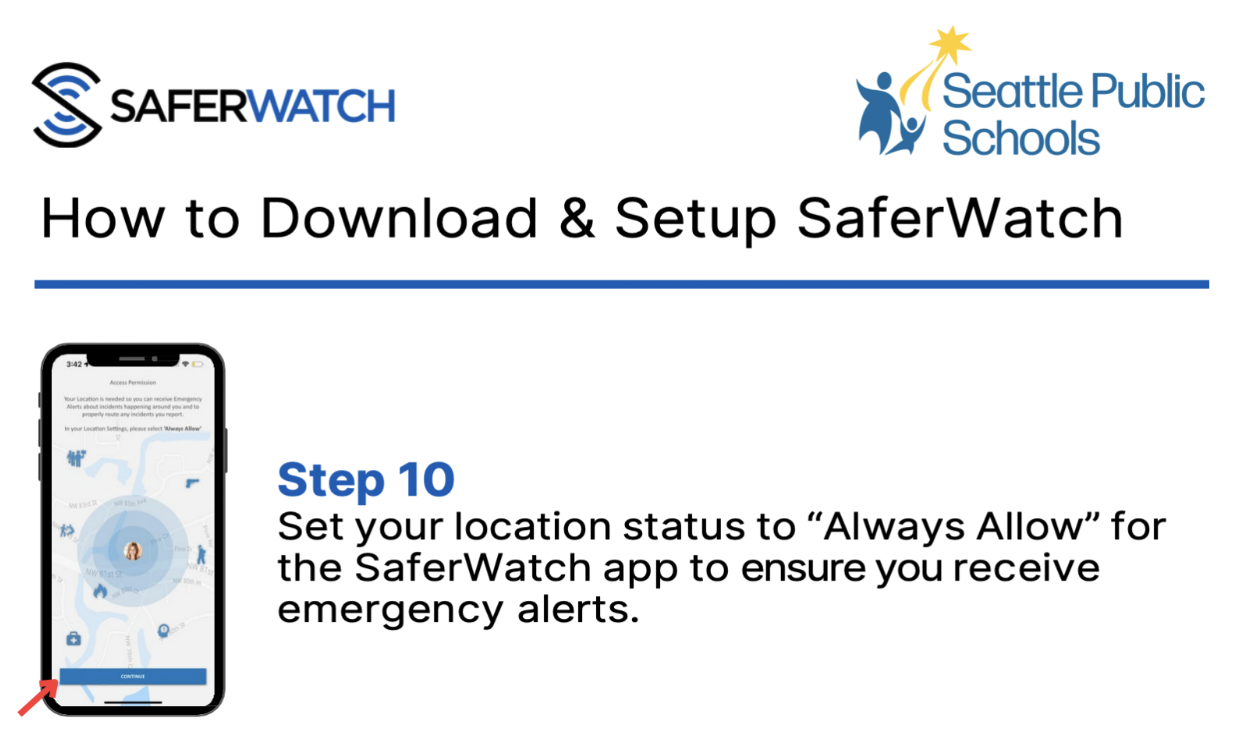
Screen shot of the SPS SaferWatch installation guide directing students, staff, and families to enable always-on location tracking.
The district messaging and SaferWatch marketing materials explain that user location is used to attach location to reports of concerns, to pinpoint individuals in an emergency. For staff, location is also used to disable panic button features when off-campus.
Online safety experts generally caution against allowing always-on location access to any app. Even if the app is trusted, location data is still vulnerable to hacks by malicious third-party actors. Even the NSA agrees!
In fact, malice is not even required. In 2025, a SaferWatch deployment in Florida accidentally exposed users’ names, email addresses, phone numbers, and real-time locations. SaferWatch later released a statement that apologized for the multiple notifications users received, but did not apologize for the actual data or privacy breach.
Beyond Sacajawea
The remaining SaferWatch features highlighted by SPS are less relevant to Sac. The additional components include:
Law enforcement access to live video and audio inside schools: As far as I know, Sac doesn’t have video cameras or microphones inside the building.
The ability for students to anonymously report on their peers: Sac students are mostly too young and phone-free for this to be an issue. At JAMS, though, there is a poster in the hallway encouraging students to report concerns to the app. Frustratingly, the poster doesn’t ask kids to consider talking to a teacher or counselor first. See photo below.
Panic alerts that let staff enable instantaneous lockdowns: It’s unclear (to me, at least) what would happen at Sac specifically if someone on staff were to trigger such an alert. We know that Sac occasionally goes into shelter-in-place mode, so clearly there is already precedent for something along these lines.
You can read more on the rollout of SaferWatch at SPS in my Bulletin article about it.
As always, if you have questions or corrections I can be reached at advocacy@sacpta.org.
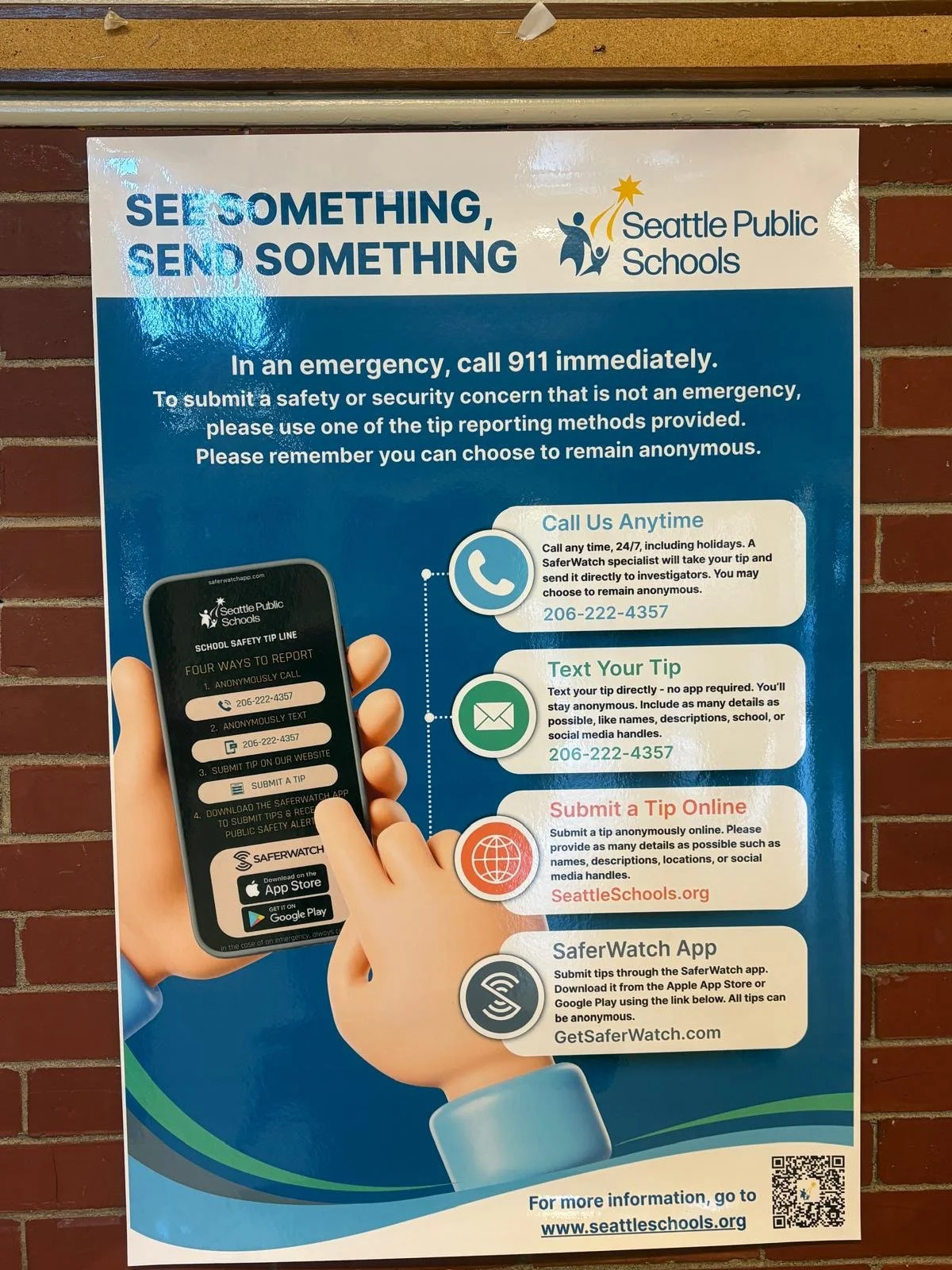
An SPS+SaferWatch poster in the hallway at JAMS. It encourages students to report directly to SaferWatch instead of to a trusted teacher or counselor.